Get the Blogger Blogs Index Page
Wiki Article
Having an index page or sitemap on your Blogger blog is essential for any blogger looking to improve website navigation and attract visitors, as well as boost search engine rankings like Google. In this article, we'll explore the importance of an index, how to add it, and a ready-made code template for easy installation without requiring any programming experience.
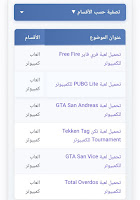
What is the sitemap page in a Blogger blog?
The index page is a page that lists all blog posts, organized by category or section. This page provides an easy way for visitors to browse posts and find the content they are looking for. It also helps search engines index the content more effectively.
The importance of the index page for search engines (SEO)
One of the most important benefits of an index page for SEO is:
- It makes it easier for search engine bots to navigate your site and index articles.
- It increases the number of pages indexed in Google.
- The user experience is improved, which reduces the bounce rate.
- It enhances internal links between topics (Internal Linking).
Features of the dynamic index in Blogger
We offer you an advanced index code that includes the following features:
- Automatic download of all topics (up to 500 topics at once).
- Filter by category with one click.
- Sleek and mobile-responsive design.
- Easy to install without modifying template codes.
How to add an index page step by step
Step 1: Create a new page
From the Blogger dashboard, go to Pages > New Page , and name it, for example: "Index of Topics" or "Sitemap".
Step 2: Paste the code into the HTML editor
Switch to HTML mode in the editor, and paste the following code:
<link rel="stylesheet" href="https://cdn.jsdelivr.net/gh/mr-abu-guda/blfym-scripts/stylesheet-SiteMap.css">

<div id="blfym">
    <div class="filter-container">
        <div class="filter-dropdown">
            <button onclick="toggleFilter()" class="filter-btn">تصفية حسب الأقسام ▼</button>
            <div id="filterDropdown" class="filter-content">
                <label><input type="checkbox" class="filter-checkbox" value="all" checked> عرض الكل</label>
            </div>
        </div>
    </div>

    <div id="loadingIndicator">
        <span class="spinner"></span>
        <span class="loading-text">جاري تحميل المحتوى، الرجاء الانتظار...</span>
    </div>

    <div id="contentTable" style="display:none;"></div>
</div>

<script src="https://cdn.jsdelivr.net/gh/mr-abu-guda/blfym-scripts/script-to-SiteMap.js"></script>

<script>
var posts = [];
var categories = new Set();
var currentFilter = 'all';

var script = document.createElement('script');
script.src = '/feeds/posts/summary?max-results=500&alt=json-in-script&callback=loadData';
document.body.appendChild(script);
</script>
Step 3: Publish the page and link it to the main menu
Click the "Publish" button, then add the page link to the main navigation menu of the blog so that it is visible to visitors.
Tips for improving topic indexing for search engines
- Use a title that includes the keyword, such as "Topic Index" or "Sitemap".
- Add a custom page description in the search settings.
- Make sure to update the index automatically using this type of dynamic script.
conclusion
Adding a professional index page to your Blogger blog is an important step to improve visitor experience and boost your blog's search engine ranking. Using the ready-made code above, you can install a complete index in minutes without needing any external plugins or technical expertise. Don't forget to share the page in the top or sidebar menu to ensure your visitors can benefit from it to the fullest extent.
Report this wiki page